> ## Documentation Index
> Fetch the complete documentation index at: https://densify-sync-changelog-34.mintlify.site/llms.txt
> Use this file to discover all available pages before exploring further.
# Improving Node Health
> Understand key node health risks and how Kubex recommendations and automation reduce operational instability.
## Improving Node Health
Two of the most important node health risks are sustained saturation and resource imbalance across nodes.
## 1. CPU and Memory Saturation
CPU and memory saturation occur when utilization remains very high for prolonged periods.
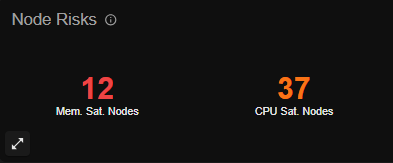
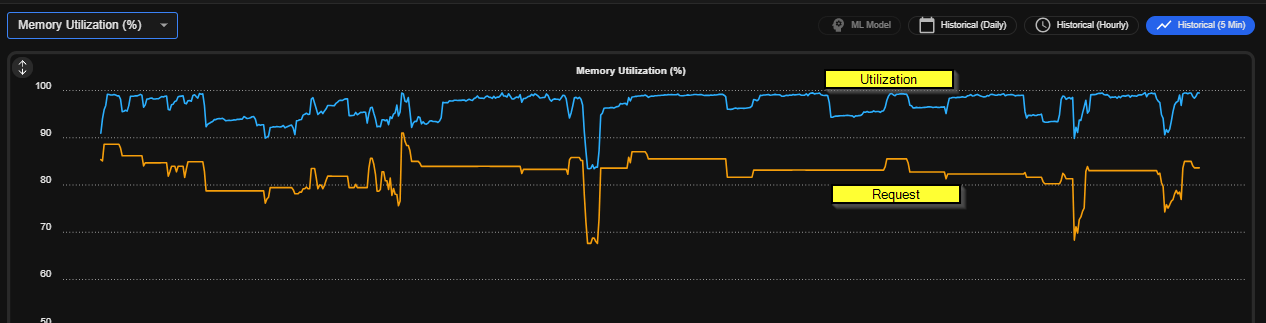 Typical causes include:
* Mismatch between configured requests and actual workload usage
* Missing CPU or memory requests and limits
When saturation is not addressed:
* CPU saturation can cause throttling and degrade application performance
* Memory saturation can cause OOM kills and workload instability
### Recommended Action
Apply Kubex recommendations for containers to better align requests with actual usage and reduce saturation risk.
For the most efficient and hands-off execution path, use Kubex automation to apply approved recommendations at scale. See [Automation Overview](/docs-kubex/Content/Kubex/Automation_Engine_Overview)
## 2. High CPU and Memory Balance Ratios
High CPU and memory balance ratios indicate uneven usage across nodes. Some nodes are heavily loaded while others remain underutilized.
This is commonly caused when container requests and actual usage are not aligned.
A high imbalance can destabilize the environment by increasing contention on busy nodes while wasting capacity on underused nodes.
Typical causes include:
* Mismatch between configured requests and actual workload usage
* Missing CPU or memory requests and limits
When saturation is not addressed:
* CPU saturation can cause throttling and degrade application performance
* Memory saturation can cause OOM kills and workload instability
### Recommended Action
Apply Kubex recommendations for containers to better align requests with actual usage and reduce saturation risk.
For the most efficient and hands-off execution path, use Kubex automation to apply approved recommendations at scale. See [Automation Overview](/docs-kubex/Content/Kubex/Automation_Engine_Overview)
## 2. High CPU and Memory Balance Ratios
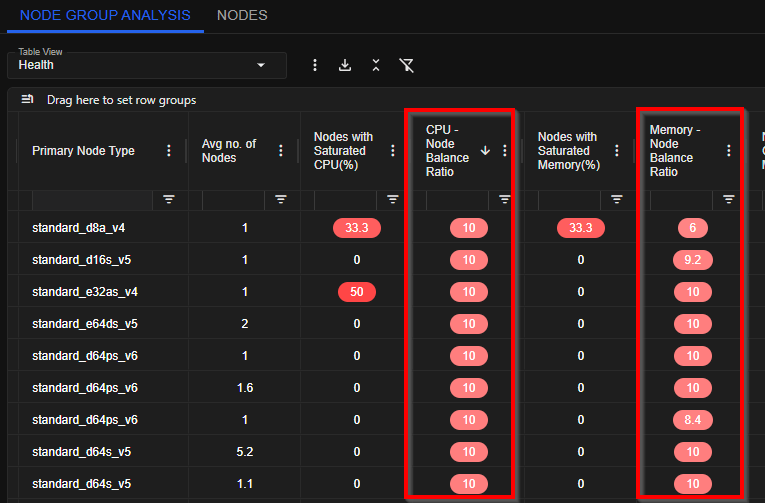
High CPU and memory balance ratios indicate uneven usage across nodes. Some nodes are heavily loaded while others remain underutilized.
This is commonly caused when container requests and actual usage are not aligned.
A high imbalance can destabilize the environment by increasing contention on busy nodes while wasting capacity on underused nodes.
 ### Recommended Action
Use Kubex container recommendations to rebalance resource demand, then apply them through Kubex automation to continuously maintain healthier node distribution.
## Related Topics
* [Container Optimization](/docs-kubex/Content/Kubex/container_optimization)
* [Automation Overview](/docs-kubex/Content/Kubex/Automation_Overview)
* [Optimizing Node Cost](/docs-kubex/Content/Kubex/Optimizing_Node_Cost)
### Recommended Action
Use Kubex container recommendations to rebalance resource demand, then apply them through Kubex automation to continuously maintain healthier node distribution.
## Related Topics
* [Container Optimization](/docs-kubex/Content/Kubex/container_optimization)
* [Automation Overview](/docs-kubex/Content/Kubex/Automation_Overview)
* [Optimizing Node Cost](/docs-kubex/Content/Kubex/Optimizing_Node_Cost)